Authenticate Investor with SID and SRE
To verify an investor requesting authentication, from the Page Menu:
- For Individual Investor: Go to Administration > Individual Investor
For Institutional Investor: Go to Administration > Institutional Investor.
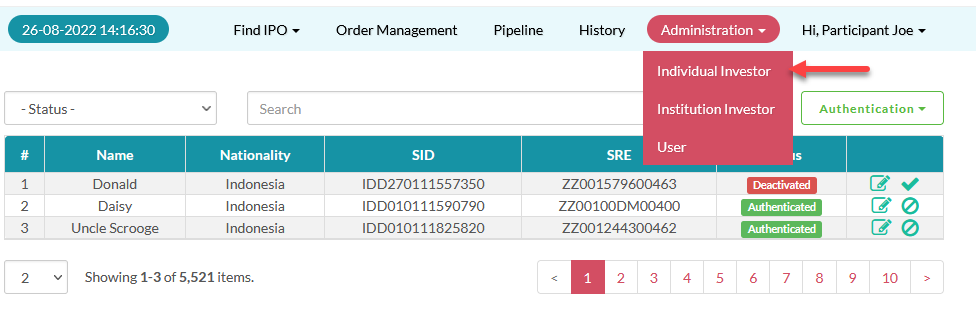
- Select Investor > Update
 .
.
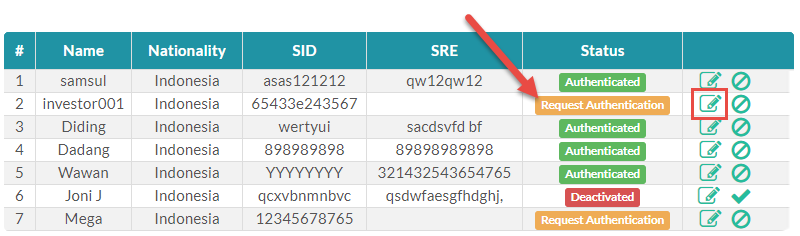
Unverified investor has the Request Authentication status, this indicates they have registered and is requesting authentication from you to be able to submit an order.
- Check investor data, including the SID and SRE, if investor data are correct, click Save.
On the investor user interface, investor can see their authentication status:
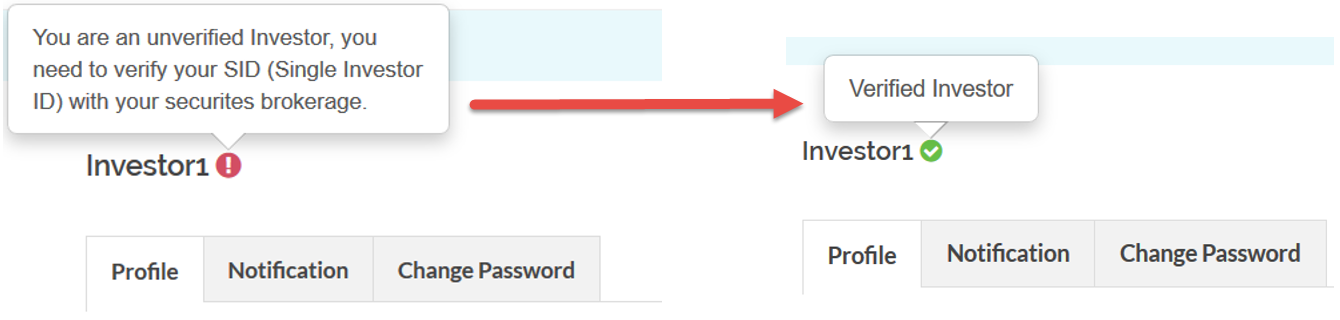
 An unverified investor (Request Authentication status) or a Deactivated investor can not submit any order, make sure their status are Authenticated to allow your investor to submit an order through their own Electronic Public Offering System account.
Make sure you enter the correct and active SID and SRE numbers when authenticating your investor, these will be validated with KSEI's SID database, incorrectly submitting the data will return a Deactivated status for the investor until you resubmit the correct data.
Created with the Personal Edition of HelpNDoc: Why Microsoft Word Isn't Cut Out for Documentation: The Benefits of a Help Authoring Tool