Edit Pipeline and Order Access
For user with Administrator role only.
Administrators can allow or deny access to a participant to create a new pipeline and new order.
Important to note that when a participant is denied access to create a new pipeline that participant is still able to continue on the ongoing pipeline if they have one, however, they will not be able to create a new one.
To allow or deny a participant's access to create new pipeline and new order, from the Page Menu:
- Go to Setting > Security Broker.
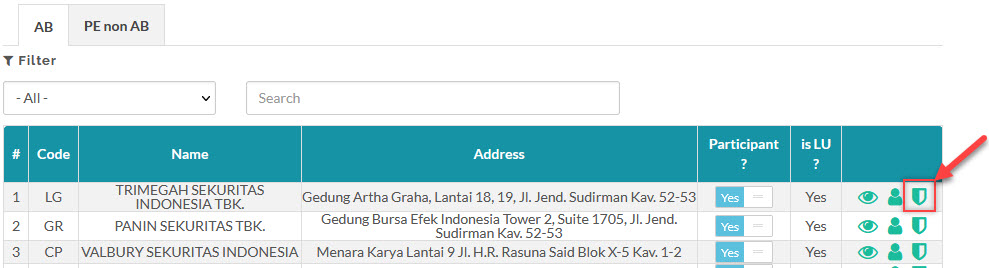
- Select Participant > Access
 .
.
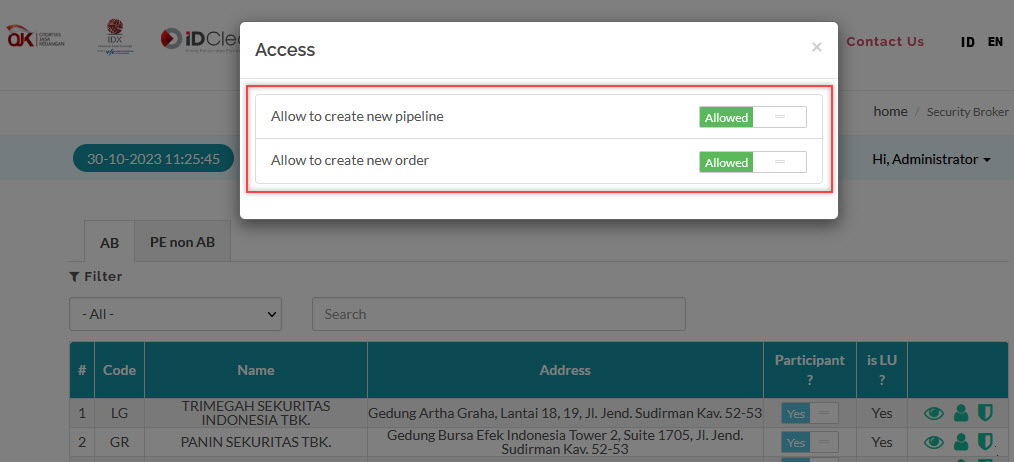
- Set Toggle button to Allowed or Deny to allow or deny selected participant to create new pipeline or new order.
Created with the Personal Edition of HelpNDoc: Converting Word Documents to eBooks: A Step-by-Step Guide with HelpNDoc