Login/Logout
Login
If you are a Participant and your assigned role is Master, Maker or Approver, to login to the system:
- On your web browser, go to https://e-ipo.co.id.
- On the Header Menu, click Login.

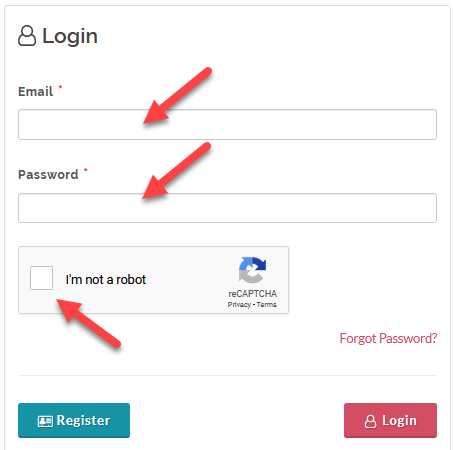
- On the login form, input your email, password, and captcha.
- Click Login.
- Wait for the system to send an authentication link to your email, open your email and click the authentication link (or alternatively, copy and paste the authentication link to your browser's address bar and click enter).
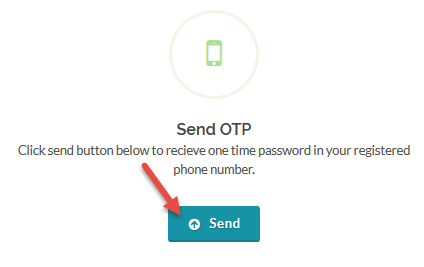
- After you click the authentication link you will be redirected to the OTP (One Time Password) verification page, click Send to receive the the OTP on your mobile phone.
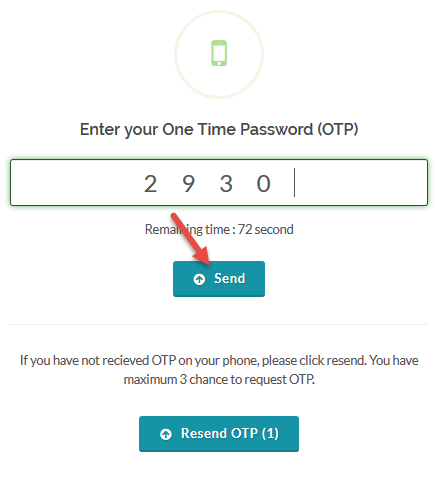
- Input the OTP and click Send to complete the login process.
Logout
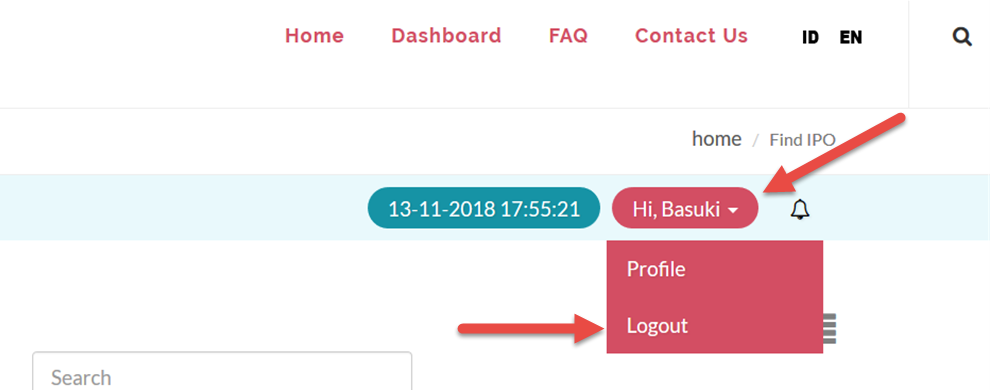
To logout, from the Page Menu:
- Click or hover your mouse cursor on your user name.
- Click Logout.
Created with the Personal Edition of HelpNDoc: Eliminate the Struggles of Documentation with a Help Authoring Tool